
Distributed System and its advantage disadvantage
What is Distributed System
"In a Distributed system, multiple Autonomous independent computers are connected together and used as a single system. It is not necessary that all the computers are connected in one place. It can also be connected in different places if all the computers are in the same place. Connected in place, it will be called LAN Distributed System and if all the computers are connected in a different place then it will be called WAN Distributed System. "
Distributed System requires three things
- Network
- Distributed Application
- Middleware Service
The distributed system is made up of a collection of Autonomous computers. These systems are connected through a network and Distribution Middleware. Which enables computers to coordinate with their activities. And shares system resources. So that users get the system as a Single Integrating Computing Facility.
A distributed computer system consists of a number of software components. Which are on multiple computers, but run as a single system. Computers that are in a distributed system can be physically close to each other and are connected through a Local Network. Or they are connected through Wide Area Network. A distributed system may consist of several configurations in the form of mainframes, personal computers, workstations, etc. The goal of Distributed Computing is to create a network that acts like a single computer.
Distributed System is based on the Client-Server Architecture system -
Client-server architecture is a common way of running software on a distributed system is to separate the functions into two parts of the Clients and Servers. A client is a program that uses those services. Which are made available by other programs. Those who provide Programs service. They are called Servers. The client requests a request for a service and the server performs this request.
The general design of the Clients and Server System uses three tiers-
1. A client who interacts with the user.
2. An application server that holds the business logic of the application.
3. Resource manager that stores data.
Advantages and Disadvantages of Distributed System
Cost
Hardware used for Computers Component has a low cost depending on performance.
1. Performance
The performance layer is good by using the combined processing and storage capacity of many Nodes. That is, the collection of processes gives better performance than centralized computers.
2. Reliability
Users can change this at the hardware fault. That is, if some machine becomes Crash, System Survive can do it.
3. Distribution
Some applications such as E-Mail and the Web are distributed naturally.
4. Sharing of data/resources
It is necessary to prepare data in many applications. Such as backing reservation system etc.
Disadvantages of Distributed System
1. Software Complexity
Developing distributed software is complex and confusing as compared to traditional software, so it is more expensive to develop it. And there is a lot of Chance of gals in it.
2. Network Problems
Many problems arise due to network infrastructure, due to which there is the loss of message, overloading, etc.
3. Security
The Distribute System consists of several components. Sharing data between these components generates the problem of data security.
4. Design Issue of Distributed System -
Following are its major Design Issue, which is specifically generated from the Distributed Nature of the application.
1. Transparency
2. Communication
3. Performance and Scalability
4. Heterogeneity
5. Openness
6. Reliability and Fault Tolerance
7.Security
1. Transparency - Under this, the following points are considered
(a) Local and remote resources are accessed using Identical Operations.
(b) Users cannot tell where the hardware and software resources are located, these resources are CPU Files Database, etc. The name of the resource should not encode the location of the resource. (c) Resources should be independent of moving from one location to another without changing their name.
2. The components of the communication-distributed system should be communicated in order to interact. These indicate support on two occasions.
(a) Networking Infrastructure.
(b) Appropriate Communication Primitives and Modems and their Implementation.
3.Performance and Scalability Performance and Scalability - The following major thumb impressions affect a distributed system performance
(a) Performance of individual workstations.
(b) Speed of Communication Infrastructure.
4. Heterogeneity-distributed applications are generally heterogeneous at the following points
(a) Different hardware - Mainframe, Workstations, PCS, Servers, etc.
(b) Different software - Unix, MS Windows IBM OS / 2, Real-time OS, etc.
5. Openness- An important feature of distributed systems is Openness and Flexibility. The following points are considered under this
(a) Each service should be accessed equally by each client.
(b) It is easier to install and debug and implement new services.
6. Reliability and Fault Tolerance- The main advantage of creating a distributed system is to improve reliability.
Reliability- If the machines go bad then the system should work with the number of resources changed. Data should not be lost on the system and copies should be stored correctly on different servers.
7. Security- The following points fall under the security of information resources
(a) Restricting access to the unauthorized person.
(b) Protection against change and corruption.
compiler vs interpreter
compiler vs interpreter
Difference between Compiler and Interpreter
Programmers typically write computer programs using a high-level language. A high-level language is a language that a user can understand. The language that the user understands is called source code. However, the computer does not understand high-level language. The computer only understands 0 and 1 binary numbers called machine codes.
To convert source code and high-level language into machine code, both compiler or interpreter are used. But there are differences between how the compiler or interpreter works. The compiler is a translator that converts source code (high-level language) into machine language. Whereas Interpreter is a program that mimics the execution of a program written in source code. The main difference between a compiler and an interpreter is that the compiler translates the entire program at once and tells whatever error occurs while the interpreter translates one line and if there is an error in a line, as long as that error is not fixed, it does not proceed.
What is Compiler?
The compiler is a translator that converts source code (high-level language) into machine language. It translates the source code into machine code to create an executable file.
The programmer can execute this object file after copying it to another computer. In other words, after the program is compiled it becomes an independently executable file that does not require a compiler to execute.
What is an Interpreter?
An interpreter is a program that performs the task of converting programs written in a high-level language into machine language. The interpreter translates each instruction into machine language alternately. It does not translate all the instruction of high-level language programs into machine language simultaneously.
What is Assembler
Assembler is a program that translates assembly language into machine language & nbsp; Is Apart from this, it translates high-level language into machine language. The assembler can convert mnemonic code such as ADD, NOV, SUB, etc. into binary code.
Difference between compiler and interpreter
compiler vs interpreter
| # | Compiler | Interpreter |
|---|---|---|
| 1. | Compiler scans the whole program in one go. | Translates program one statement at a time. |
| 2. | As it scans the whole code in one go, the errors (if any) are shown at the end together. | it scans code one line at a time, and errors are shown line by line. |
| 3. | Main advantage of compilers is it’s execution time. | Interpreters being slow in executing the object code, so it is less preferred. |
| 4. | It converts the source code into object code. | it scans it line by line |
| 5 6 7 8 | It does not require source code for later execution. If there is an error in the syntax of the program the compiler tells the error later. Intermediate object code is generated in it so memory is used in it. Debugging is not easy | It requires source code for later execution. The interpreter translates each line and if an error is present in a line, it does not proceed until the error is corrected. It does not generate any intermediate object code, so it uses less memory. It is easy to debug |
| Eg. | C, C++, C# etc. | Python, Ruby, Perl, SNOBOL, MATLAB, etc. |
A significant difference between compiler and interpreter
- The compiler translates the entire program, but the interpreter translates the program with a single line.
- The compiler is comparatively faster than the interpreter because the compiler can translate the entire program at once while the interpreter compiles each line of code one after the other.
- The compiler requires more memory than the interpreter due to the generation of object code.
- The compiler shows all the errors at once while the interpreter translates one line and shows the error.
- When an error occurs in the program in the compiler, it stops the program and re-translates the entire program after correcting the error. In contrast, the interpreter translates a line and if an error occurs, it stops its translation and translates only after removing the error.
- compiler process is a two-step process in which the source code is first translated to the target program and then executed. Whereas Interpreter, it processes a step in which the source code is compiled and executed at the same time.
- The compiler is used in programming languages such as C, C ++, C #, Scala, etc. While Interpreter is used in PHP, Ruby, Python, etc. languages.
References:
http://en.wikipedia.org/wiki/Interpreter_%28computing%29
http://en.wikipedia.org/wiki/Compiler
TechMyEducation
#difference between compiler and interpreter
What is Deadlock? conditions of deadlock, deadlock prevention, deadlock avoidance,deadlock detection, disadvantages of deadlock
What is Deadlock? conditions of deadlock, deadlock prevention, deadlock avoidance,deadlock detection, disadvantages of deadlock
Hello friends! Today we will read about Deadlock in (what is the deadlock in the operating system?) In this post and will also see its conditions. Read it completely. So let's start: -
Deadlock
Deadlock is a condition in which two or more processes fight or require for only one resource, due to which no one is able to access the resource.
In other words, " Deadlock condition occurs when two or more resources is requiring a resource to complete their process execution but that require resources is in use by another process by which the execution of process wont be completed ".
It is a situation in the operating system in which one process goes to waiting state because the resource is held by another process.
For example suppose there are two friends who wants to ride bike due to which both are fighting.One has a bike key and the other has money for petrol.
So in this condition neither of the two friends are able to ride bike and neither of them is ready for cooperation.This is called deadlock.

Fig: -deadlock
In picture we have two processes x1 and x2 and two resources Rk1 and k2.k1 is allocated to process x1, and k2 is allocated to process x2. But x1 needs k2 to complete the process so it requests k2, but k2 is already allocated with x2.
Same as process x2 requires k1 to complete its execution, but k1 is already allocated with x1.
Both x1 and x2 will always wait for each other's resources. This is called DEADLOCK.
Conditions of Deadlock
Deadlock has four conditions, which are as follows:- mutual exclusion
- hold & wait
- no preemption
- circular wait
In this, only one process can use the resource at a time. That is, no two processes can use one resource at a time.
2: - Hold & wait - In this, the process keeps holding one resource while waiting for another resource.
3: - No preemption - A resource which is allocated for a process cannot be forcibly allocated to another process. Process releases the resource on its own.
4: - Circular wait - In this, every process waits for a resource which is held by another process and all the processes wait for resources in the form of a circle. Therefore it is called circular wait.
Deadlock Prevention - Stop deadlock
To prevent deadlock, we have to prevent any one of the four conditions above the deadlock from happening. Only then can we stop the deadlock from happening.Mutual exclusion - If we can share a resource, then we can prevent mutual exclusion from happening. But we have many resources which cannot be shared such as - tape driver, printer etc. Because of this we cannot always prevent deadlock by mutual exclusion.
Hold & Wait - If we allocate the resource before the execution of the process, we can prevent the condition of hold and wait from happening. But its disadvantage is that it reduces the utilization of the device very much.
No preemption - We can prevent this condition from happening by releasing a resource held by a process.
Circular wait - To prevent this condition, we can allocate resources in decreasing or increasing order of the process.
Deadlock avoidance -
Deadlock prevention algorithm is much less effective as it reduces the utilization of the device and the throughput of the system. But we can avoid deadlock.To avoid the deadlock, we use the bank penalty algorithm.
Deadlock Detection
The os can detect deadlocks using a resource scheduler. Resource scheduler helps to track the resources allocated to all the processes of the operating system. So whenever a deadlock occurs, it is solved using algorithms.Disadvantage of Deadlock
Its disadvantages are as follows: -This causes delays in the execution of the process.
In this, the process should know what resource it will need in the future.
Preemption occurs more often than necessary.
Benefits of Deadlock -
Its benefits are as follows: -
This situation is good for processes that perform only one task.
deadlock avoidance requires no preemption.
references: -
https://www.javatpoint.com/os-deadlocks-introduction
https://www.geeksforgeeks.org/introduction-of-deadlock-in-operating-system/
Request: - If you liked this post, then share it with your friends and if you know anything more about deadlock.Tell us through the comments.
I keep bringing you fresh new notes and articles. If you have any suggestion or have any question related to any subject, then you can also tell it by commenting below. I will put it in 1-2 days. Thanks.
Input devices of computer
Input devices of computer
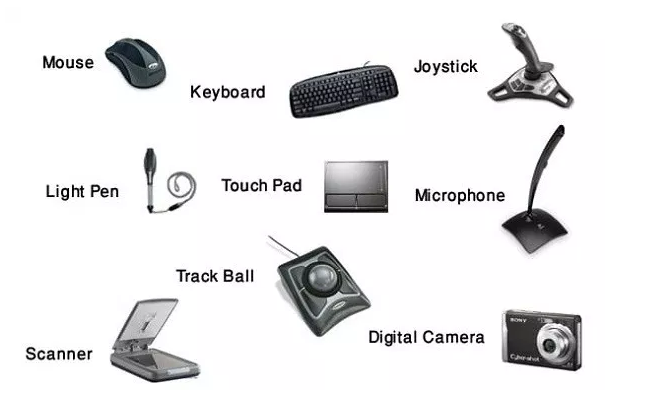
Input Devices of Computer
Input devices are devices through which we can make our data or instructions input in the computer. Input devices facilitate connectivity between computers and humans. There are many Input Devices in the computer. These devices direct the computer's brain to do what? Input Device is available in many forms and all have specific purposes. For typing, we have a keyboard, which sorts our instructions.
“Input Device is the device that directs our instructions or commands to the computer's brain, the CPU. (C.P.U.). "
There are several types of Input Device which are as follows -
- Keyboard
- Mouse
- Joystick
- Trackball
- Light pen
- Touch screen
- Digital camera
- Scanner
- Digitizer Tablet
- Bar Code Reader
- OMR
- OCR
- MICR
1. Keyboard
A keyboard is peripheral to a computer, which is partly like a keyboard's typewriter. The keyboard is designed to input text and characters. Physically, computer keyboards are rectangular. It contains about 108 Keys. The keyboard has many types of keys (Alphabet), Number, Number, Symbol, Function Key, Arrow Key, and some special Keys as well. Are

We can divide its keys into six parts based on the structure of the keyboard -
Alphanumeric Keys
Numeric Keypad
Function Keys
Special Purpose Keys
Modifier Keys
Curser Keys
2. Mouse
At present, the mouse is the most popular Pointer Device, which is used to create images or graphics, as well as to click on a button or menu. With this help, we can use our PC without using the keyboard. Can control

Mouse functions
- Clicking
- Double Clicking
- Right Clicking
- Dragging
- Scrolling
Mouse type
There are usually three types of mice.
Mechanical Mouse
Optical Mouse
Cordless Mouse
3. Joystick
This device is an input device used to play video games, it is often used by children to play games on the computer. Because this is an easy way to teach the computer to children. Although all computer games can be played through the keyboard, some games are played at a fast pace, children do not feel comfortable in those games, so a joystick is used.

The track ballon is a pointing input device. Which acts like a mouse. It has a raised ball and some buttons. Normally, while holding, you have your thumb on the ball and your fingers are on its button. To move the pointer on the screen, the ball with the thumb rotates the ball, the trackball is not required to rotate like a mouse, so it occupies relatively less space. It is used in Laptop, Mobile and Remold.

5. Light Pen
Light pen is used to make a picture or graphics on a computer screen. A light pen has a device like a light-sensitive pen. Therefore, light pens are used to select objects. Any graphics made with the help of a light pen can be stored on the computer and can be improved as needed.

6. Touch Screen
Touch Screen is an Input Device. It has a type of display. With the help of which a user selects a menu or an object on the screen by positioning his or her fingers due to a pointing device. It can be easily used even if a user does not have much knowledge of computer. Touch screen use nowadays railway station, airport, hospital, shopping mall, ATM It has started happening in the beginning.

A bar code reader is used to read the bar code printed on a product over a product that is used by the bar code reader and the price of the product and other related information can be obtained.

Scanner is an Input Device. It directly inputs the shape or written information on a page in the computer into the computer. Its main advantage is that the user does not have to type the information.

9. Omr (OMR)
Omr (OMR) or Optical Mark Reader is a device that checks the presence and absence of a pencil or pen symbol on a paper in which the highlighted paper is highlighted and the reflected light is tested. Where the sign is present, the intensity of the reflected light will be less than that part of the paper. Omr (OMR) is used to check the answer-book of an exam. These exam papers have optional questions.

Optical Character Recognition or OCR is one such technique. Which is used to read a particular type of symbol, letter, or number, these characters can be read through the light source. The OCR equipment reads the characters printed from typewriters, the character of the cash register and the character of the credit card. OCR fonts are stored in the computer. Whom OCR (OCR) is called standard.
MICR
Magnetic Ink Character Recognition is widely used in banking, where people have to work with large numbers of checks. In short, where does it go to MICR? MICR is used to read characters printed with Magnetic Ink. This machine is fast and automatic as well as the chances of making mistakes in it are absolutely nil.

Simple summary
- Input devices are devices by which we can input our data or instructions into a computer.
- Input devices facilitate connectivity between computers and humans.
- Input devices are devices that allow our instructions or commands to the computer's brain, the CPU. Reach to.
- Magnetic ink character recognition is widely used in the backing field.
- An optical mark reader is a device that checks the presence and absence of a pencil or pen symbol on a paper.
- Optical character recognition is a technique used to read a particular type of symbol, letter and number.
computer memory ? types of memory ,primary memory ,secondary memory,ram,rom
computer memory? types of memory ,primary memory ,secondary memory,ram,rom
What is Memory?
This device stores the instructions received by the Input Device by storing it in the computer where it also goes to the memory of the computer. In a human, it is a brain to remember some things, similarly, in a computer, memory is there to remember data. This memory is an integral part of C.P.U., it is also called Computer's Main Memory, Internal Memory, or Primary Memory.
"Keeping any instructions, information or results stored is called memory."
computer memory? types of memory, primary memory, secondary memory, ram,rom
Computers have more than one memory. We can generally classify them as Primary and Secondary memory. Primary memory is both Volatile and Non-Volatile. Temporary Memory keeps data from temporarily turning on the computer until the computer is shut down, that is, data is lost from the computer when the computer suddenly shuts down or power goes down. Permanent Memory starts your computer. Are helpful in doing. It contains some very useful firmware which helps in boosting the computer. The process of starting a booting computer is called the main memory. Secondary storage is that which keeps our data for a long time. Secondary storage comes in many forms. Floppy disk, hard disk, cd Etc.
Bit or byte
The data stored in memory is converted to 0 or 1, 0 and 1 are jointly called binary digits. In short, they are also called bits. This bit is the smallest unit to measure the space in a computer's memory.
8 Bits = 1 Bytes
Types of memory
- Primary Memory
- Secondary Memory
Primary Memory
Memory is the most important part of a computer where data, information, and programs are present during the process and are available immediately when needed. This memory is unstable memory because the data written in it is erased when the computer is shut down or goes on. This is called primary memory. It is also known as primary memory or main memory.

There are mainly two types of primary memory -
RAM
ROM
1. RAM (Random Access Memory)
RAM or Random Access Memory is the temporary memory of a computer. Data input from the keyboard or any other input device is stored in RAM before processing and the CPU. The data or program is stored temporarily in the RAM, as per the requirement, the stored data stored in the RAM is erased when the computer is shut down or power is gone. Therefore RAM is called Volatile or Temporary Memory. There are many types of RAM capacity or size like - 4 MB, 8 MB, 16 MB, 32 MB, 64 MB, 128 MB, 256 MB,2 GB,4GB, etc.
There are three types of RAM.
- Dynamic ram
- Synchronous ram
- Static ram
Dynamic RAM is abbreviated as DRAM. The DRAM is the most common RAM and it needs to be refreshed as soon as possible. Refresh here means to power the chip, it refreshes about a thousand times in a second, and each time it refreshes before it erases the object, its speed is due to a quick refresh. Are less.
Synchronous ram
Synchronous RAM is much faster than DRAM. The reason for its high speed is that it is the CPU. Refresh according to clock speed. That is why they transfer data faster than DRAM.
Static ram
Static RAM is RAM that is less refreshed. Due to less refresh, it keeps the data in memory longer. S-RAM is faster and more expensive than Diagram.
2. ROM (Read-only memory)
The full name of ROM is a read-only memory. This is a Permanent memory in which programs are stored at the time of building a computer. Stored programs cannot be changed and deleted in this memory, they can only be read. So this memory is called read-only memory. The data stored in ROM is not destroyed even after the computer is switched off. Therefore, ROM is called non-volatile or permanent memory.
There are different types of Rome which are as follows -
- PROM (Programmable Read-Only Memory)
- EPROM (Erasable Programmable Read-Only Memory)
- EEPROM (Electrical Programmable Read-Only Memory)
PROM's full name is Programmable Read-Only Memory, it is such a memory that once the data is stored in it, it cannot be erased nor change.
EPROM
The full name of EPROM is Erasable Programmable Read-Only Memory, it is similar to PROM, but the program stored in it can be erased only by ultraviolet rays and new programs are stored.
EEPROM
The full name of EEPROM is Electrical Programmable Read-Only Memory. There is also a new technology EEPROM, in which the method of modulating the program from memory.
RAM vs ROM
RAM
- Temporary Storage
- Stores data in MBs
- Volatile
- Used in normal Operations
- Writing data is faster
- Permanent storage
- Stores data in GBs
- Non-volatile
- Used for the startup process of computer
- Writing data is slower
Summary Words
- Storing any instructions, information or results is called memory.
- Memory is an integral part of C.P.U., it is also called Computer's Main Memory, Internal Memory, or Primary Memory.
- The full form of RAMis a random access memory.
- Random-access memory is the computer's temporary memory.
- The full form of ROM is a read-only memory.
- Read-only memory is the computer's permanent memory.
system software vs application software
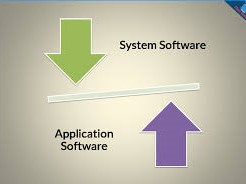
system software vs application software
Definition of System SoftwareThe system software is a software written in assembly language, the main purpose of the system software is to manage and control system resources. It takes care of memory management, process management, security, and system security. It also provides computing environments for other software such as application software.
The system creates an interface between the software system and the user's hardware. This user understands the input, this application also acts as an interface between the software and the hardware. When the system is running, the system software starts running and manages all the resources of the system and it runs until the system is closed.
The system software is general purpose software and is essential for computer work. Typically, the end user does not interact directly with the system software. The user interacts with the GUI created by the system software. The best example of system software is the operating system.
Definition of application software
Application software is software written in a high-level language such as Java, VB, .Net, etc. Application software is a special user and is designed to meet the user's requirements. It can be a computing software, editing software, designing software, etc. This means that each application software is designed for a specific purpose.
The application runs on platforms created by software system software. The application software acts as an intermediary between the end user and the system software. You can install any application software on a system software Application software is not required to run the system, but it makes the system useful. Examples of application software are MS excel, powerpoint, etc.
Difference between system software and application software
- The system software is designed to manage system resources such as memory management, process management, security, etc. and this application also provides a platform for software to run. On the other hand, the application is designed to satisfy user requirements to perform software specific tasks.
- The system is written in the lower-level language, like software assembly language. However, application software is written in a high-level language like Java, C ++,.Net, VB, etc.
- As soon as the system software is up and running, the system is turned on and running until the system is closed. The application software starts when the user starts it and the user closes it.
- A system cannot run without system software, while the application software user is specific they are not required to run the system; They are only for users.
- While the system software is general purpose software, while the application software is a specific purpose software.
- The best example of the system software is the operating system, while the examples of application software are Microsoft excel, google chrome, etc.
- Conclusions:
- Both, system software and application software make a system useful for the end user. The system software is mandatory for system work. Similarly, the application software user is required to do their specific work.
Explain the secondary storage devices used in modern day computing?
secondary storage devices

operating system

operating system

- character user interface (CUI)
- Graphical user interface (GUI)
Characteristics of Operating System
advantage of operating system (operating system benefits)
- It can be easily used because it has a graphical user interface. & Nbsp; And new users can run computers easily by this.
- Through this, we can share one data with a lot of users.
- Through this, we can share resources like: - Printer.
- They can be easily updated.
- It is safe such as: - windows have windows defender which detects any type of harmful files and removes them.
- Through this, we can install any game or software and run them.
- Some operating systems (like: - LINUX) are open source, we can run them on free on my computer.
disadvantage of operating system
- Some operating systems are free but some are expensive such as: - windows costs around 5000 ₹ to 10000 की.
- Running linux is a bit harder to compare than Windows.
- Sometimes it does not support any hardware,
- The risk of viruses in mac OS is high.
process control block operating system
 process control block operating system
The PCB's full name is the process control block. It is also called task control block.PCB is a data structure maintained by the operating system for each process or task.
PCB is a data structure used to store various processes information.
Process control block which is very important in multi-programming, because in many programming, many summary processes run simultaneously simultaneously, it stores information about those processes.
process control block operating system
PCB stores the following information: -
- Process name
- State of process, that is what its current state is like: - running, waiting, ready etc.
- Process resources
- Memory (which is provided to the process)
- The input and output devices used by the process
- process ID, (There is a unique indentification to indentify each process in the operating system.)
- scheduling information
- file management information
process control block operating system
description of process control block components: -

The components of the process control block operating system are as follows: -
1: - Process ID: - There is a unique ID of each process running in the computer system with multiple summary processes at one time.
Scheduling system processes with the help of this ID. This ID is made available through PCB.
Simply it is a unique ID used to uniquely identify process in OS
2: - Process state: - Each process has one state, such as: - new, ready, running, waiting, halted etc.
The process control block defines the state of each process.
3: - CPU registers: - How many types of registers can be done, because the number of registers and types of the CPU Depends on the architecture of. It covers accumulators, index registers, stack pointers and general purpose registers and so on.
4: - program counter: - program counter, the next instruction address that is executing for the process is stored.
5: - CPU scheduling information: -CPU scheduling information is used to set the priority of the processes.
6: - memory management info: - This page table, segment table, base register and store information for the limit registers.
7: - accounting information: - Includes CPU utilization, process execution time, number of processes and account no. There are information stores in the form of etc.
8: - I / O status information: - It stores information about the input and output devices that are allocated to the process.
types of operating systems in computer
types of operating systems in computer
- Real Time
- Batch
- Distributed
- Network
- Single user - Multi user
- Single tasking - Multi tasking


random access memory advantages and disadvantages and types of RAM
random access memory advantages and disadvantages and types of RAM
RAM stands for Random Access Memory. It is a computer based on a computer that stores data temporarily. (temporarily means it only stores data for some time)RAM is also called main memory, primary memory or system memory. It is also sometimes called read-write memory.
Randomly accesses the computer data by computer so that the computer can work very fast. The data sequence in the CD and hard drive is accessed, due to which they are slow.
RAM is a volatile memory and power is required to access its data if the computer is switched off, the amount of data in the RAM will be lost. If the computer is rebooted then the operating system and other files are loaded by the hard disk in R.A.M.
It is located in the motherboard and acts as a read and write at the same time. Its read and write speed is much faster than other storage devices. And RAM memory is measured in bytes (GB, MB).
advantage of RAM
1: - This increases the speed of the computer system, the higher the speed of the system the more RAM will be.
2: - The CPU can read data faster than RAM. (Compared to hard disk, CD, DVD, FLOPPY, DISK and USB)
3: - There is very little use of power in which battery life increases.
4: - There are no moving parts in it, i.e. none of its parts move.
5: - It can write and erase operations.
disadvantage of RAM
1: - The computer is less RAM, because its cost of each bit is very high.
2: - It is volatile i.e. in which data can not be stored forever.
3: - It is very expensive.
4: - This is slow (slow) from CPU cache.
History of RAM
In earlier computers, relays, mechanical counters or delay lines were used for the function of main memory.
The first random access memory was built in 1947. Whose name was william tube. In this, the cathode ray tube was used.
The second RAM was also built in 1947. Whose name was magnetic core memory.
The name of the RAM used today is - solid state memory. It was first developed by Robert Dennard in 1968.
Types of RAM
This is mainly of two types which are as follows: -
SRAM
DRAM
What is SRAM
The full name of SRAM is static random access memory . It requires a constant power to work. Due to continuous power getting it, it does not need to be refreshed.
SRAM uses very narrow transistors for each memory cell, but there is no capacitor for each cell.
Nowadays it is used in cache memory and registers. Its discovery was done in the 1990s and used in digital cameras, routers, printers and LCD screens.
advantage of SRAM
The benefits are as follows: -
It is much faster than DRAM.
It does not need to be refreshed.
It is used to create cache.
It requires medium power.
disadvantage of SRAM
This loss is low;
Compared to DRAM, this is expensive.
It is volatile when power is not lost, its data is lost.
Its storage capacity is low.
Its design is very complex.
what is DRAM
DRAM's full name is dynamic random access memory. It requires a refresh power to work. And it has a transistor and capacitor for the memory cell.
It was created in the 1970s and used in video game consoles, networking hardware, and system memory etc.
advantage of DRAM
It is cheaper than SRAM.
Its memory cell structure is very simple.
Its size is very small.
Its storage capacity is high.
disadvantage of DRAM
Its speed is very low compared to SRAM.
When power goes away, its data is finished.
It has more power consumption.
single data rate synchronous dynamic RAM (SDR SDRAM)
double data rate synchronous dynamic RAM (DDR SDRAM, DDR2, DDR3, DDR4)
difference between ram and rom
RAM vs. ROM
It is volatile memory.
This is non-volatile.
Keeps the data or information temporarily stored.
Keeps data permanently stored.
It is very fast but it uses a lot of power.
Rome is fast but less than RAM. And it uses less power.
It stores data in the MB.
Stores data in GB.
It is used to perform normal operation.
It is used for the initial process of the computer.
The size of its chip is raised by ROM.
Its chip size is small.
It is of two types - static and dynamic
PROM, EPROM, EEPROM is its type.
It requires power to access the data.
It does not require power to access data.